Old Disks and Old Metaphors

Call it a passion project. The past few days in my spare time at work I’ve been recovering data from twenty-five and thirty-year old floppy disks. The files on these old disks—CAD drawings, meeting minutes, reports, and other construction-related documents structured in 1.44 MB or smaller bundles—are interminably boring, but there is something intellectually thrilling in the process of accessing and reviewing them. I’ve been thinking of this as an archival thrill, similar in the little raised neurons it tickles to the feeling I get when chasing leads in old newspapers or digging through a box of original documents in search of names, clues, faces. Entire careers have come and gone since these files were copied to the magnetic circles in their little plastic cases. Whole computing paradigms have risen and fallen in that time, and, with them, our own sense of technical superiority to the people who authored these files. Still, the same meticulous attention to detail is evident in the files, the same sense of their own sophistication on the part of the authors, the same workaday problems we are solving today.

Working the files, I noticed two more things:

  1. The sound of a physical device reading data is special, and it can be deeply satisfying. I had forgotten the audible experience of computing—the whining, clicking, tapping, and whirring which used to characterize the entire experience. All of this is gone now, replaced by the sterile sound of fans, maybe, like wind blowing over a dried lakebed. There are audible affordances in physical media. When the sound stops, for example, the transfer is finished. When the button clicks on a cassette tape, the experience is complete.
  2. The old files on these disks are authored with maximum efficiency in mind. With only a few hundred KBs to work with, designers had to get creative in ways we don’t today. There are a lot of pointillistic graphics, tiny GIFS, plaintext, line drawings; none of the giant, full-resolution graphics we include everywhere today.

One of the disks contains a full website, preserved like a museum piece from 1999. Clicking around those old pages got me thinking about the archival thrill of the old internet.

Consider the way that the most prominent metaphors of the web have shifted over time.

It used to be that people would surf information on the internet, riding a flow state wave across documents and domains in pursuit of greater knowledge, entertaining tidbits, or occult truths previously hidden in books, microfilm, periodicals, letters, and other texts. The oceanic internet held out the sort of thrill you feel when wandering among the stacks of a vast library or perusing the Sufi bookstalls of old Timbuktu. It was an archival thrill, tinged with participatory mystique, abounding with secrets.

In the heady days of the early web, to surf was to thrill in the freedom of information itself.

When Google arrived on the scene and began its ongoing project of organizing the information on the web, feeding took the place of surfing. This act, like every triumph of industrial capital, relied first upon the extraction of surplus value from the laborers who produced the commodity—i.e., the authors of the information. That is a subject for another day. More to my point in today’s rumination, however, Google’s revolutionary commodification of the web also took advantage of the customer’s innate narcissism. You have specific and important information needs, Google says with its design language, which this text bar can satisfy.

Google delivered on this promise by surfing the web on behalf of searchers. To deploy another (very stretched) oceanic metaphor, Google turned surfers into consumers of tuna fish. Each search serves up a little can of tuna. Enter a term in the box and out pops a little tin; pop the can and get what you need, increasingly on the first page; and then get on with Your Busy Life.

The Your Busy Life warrant is the play on narcissism. You don’t have time to surf, it says, because you are important. Have this can of tuna instead.

I love tuna. I search every day. Google was so successful, however, that the web wrapped itself around the tuna-dispensing search box. By the mid-2000s, users no longer used search primarily as an entry point to the waves but, rather, as a sort of information vending machine serving up content from Google’s trusted searches.

Beginning around 2008, feeding completely overtook surfing as the dominant user metaphor of the web. As Infinite-scroll apps on smartphones took the place of websites, the purveyors of these apps took it upon themselves to predict what users would like to know, see, or do. To this end, the most talented software engineers in the world have spent more than two decades now building algorithms designed to settle users in a stationary location and serve them little morsels of information on an infinite conveyor belt. Cans of tuna became Kibbles and Bytes, piece by piece, scrolling past.

The participatory mystique, or archival thrill, as I have called it, has been almost completely displaced by this dull feedlot experience. I know that the old experience of the web exists alongside the new, that I could go surfing right now if the urge carried me away, but I lament that so many of the people who could be building more and better websites are building cans of tuna for the Google vending machine on the web or Kibbles and Bytes for the apps.

Think of what we could have.

For Digital Immersion

I have just finished Will Blythe’s searching essay on the future (and present) of literary fiction at Esquire. I’ll let Blythe’s argument stand for itself, but to briefly recap: the web, and the devices we use to access it, are radically splintering attention spans. This has already dramatically reduced the viability of literary fiction in traditional venues, he argues, but may spell serious trouble for the future of the literary novel, as well. It’s a powerful, sobering essay. I have thought and written at some length about digital tools, reading, and distraction in these pages, and I largely agree with Blythe on the impossibility of serious, focused thought in our current technological paradigm. I don’t have anything new to say on the subject of distraction, but I did have some thoughts about technology while reading the essay.

When we say “Technology” in 2023, for most people that means smartphones and apps.

This is not just how things worked out. It doesn’t have to be this way. Technology can foster immersive experiences as well as it can splinter attention spans. Technology can contribute to a flowering of literary fiction as readily as it can spell its demise. Technology could give us more literary fiction, more genre fiction, more historiography and literary criticism, more poetry, more everything, as well as extremely powerful tools to annotate, index, summarize, and recall all of these texts.

In fact, technology has given us all of these things. Take a spin around the listings of online literary journals at Duotrope. Look at the insane library of classic literature, periodicals, and texts of all kinds at Project Gutenberg or the Internet Archive. If you are an inveterate notebook-keeper, like me, look at Joplin or OneNote (just not Evernote any more, after recent changes, including a massive price hike). Or just take a look at Notepad and a filesystem. If you take notes specifically around books and articles, and need to build bibliographies, check out Zotero. Need an immersive word processor? Check out FocusWriter. I could keep going, but the point is hopefully clear by now: technology feels hopeless and limiting because our definition of technology is too narrow. One need not look far beyond the confines of iMessage or Twitter X to see that technology has radically exceeded the promise of the “Information Superhighway.”

The smartphone is not the best tool for immersive reading, thinking, and working–but not, necessarily, because of some logic inherent to the form. Smartphones are platforms for apps, and the most popular apps steal their users’ attention because that is what they have been designed to do. Take away the distraction-inducing apps, and you would take away the distraction. But which apps are you willing to delete? The makers of these apps know that attention and relationships are more powerful and pleasurable inducements to action than pretty much anything else in the world–right up there with nicotine, sugar, and opium–and using that fact to drive traffic to their apps is how they make their living. They won’t stop doing it until the demand goes away.

Here are some ways to start reducing that demand.

For Users:

  1. Turn off app notifications on your phone for everything except phone and messaging.
  2. Remove all but the most essential apps from your home screen. If you need to open an app, search for it. Bonus: if you keep notifications enabled, you won’t see badges on the app icons to draw you in.
  3. Instead of replying to messages throughout the day, set aside an hour or so for focused correspondence. You can use this time to write emails, check your DMs, or whatever. Let the messages pile up otherwise. In my experience, people understand after a very short time that you will respond later.

It falls upon those of us who build technology and care deeply about attention and immersion to build experiences that foster attention and thought. For developers, then, two quick thoughts:

  1. Resist user notifications at all costs. If your company uses notifications to drive engagement growth and sales, rather than meet legitimate business needs for the user, you work at the wrong place.
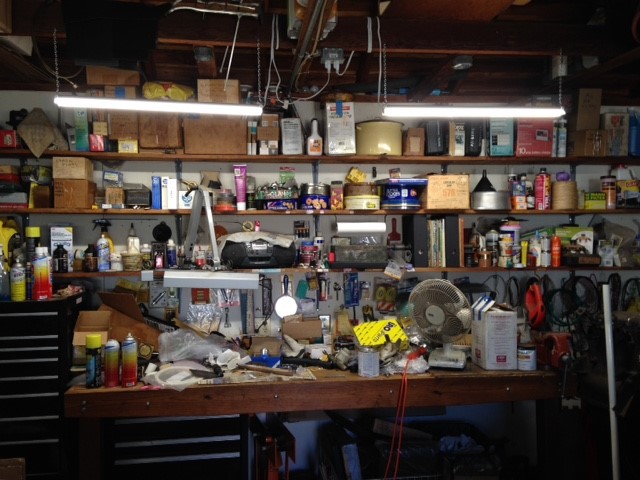
  2. Declutter the interface of dynamic elements, like popup hints and user nudges. Clutter it with tools instead. The interface of LibreOffice Writer affords a great example of this principle. Some would call it ugly, and they would be right. I believe it is ugly in the way that a well-used workbench is ugly, however. This is a happy, focused place for those who thrive among their tools. (You might think this doesn’t work well for smartphone apps, but look at how much dynamic garbage Meta crams onto the Facebook app screen. It works.)

Let’s broaden our definition of “technology” beyond smartphones and apps, and then use what we find in that land beyond to make apps on smartphones better. If we do that, much more than literary fiction is sure to benefit.

Social Media is Dead

Facebook feels like MySpace in 2008. Twitter is in a death spiral. Reddit alienated everyone. Mastodon is a navel-gazing wasteland. Threads is a graveyard of branded content and hustleporn.

Social media is circling a cul-de-sac at the end of the 2010s and everyone there is just waiting now for the Next Thing™️ to come along.

Even in the lifetime of most millennials, social media at the height of its social and cultural power existed for an extremely brief moment — maybe fifteen years — but we have acted as though it will always be with us. The Next Thing™️ will not be a Twitter replacement, however. I believe that it will look more like the time before: websites again, like this one; IM clients; chat rooms; and web rings (or federation, if you will).

The idea that we should share everything with everyone by handing it all over to a handful of powerful corporations to manage has been weird and probably wrong since the beginning. Let’s take this opportunity to build the web the way it was meant to be, instead: fiercely autonomous, deeply personal, and delightfully eclectic.

Everything Old is New Again

Here are some signs we’re back in the late ’90s and early ’00s model of the web:

  1. Search engines suck again. No link needed because you know exactly what I mean.
  2. Social media is fragmented and broken
  3. People and institutions are moving from platforms back to websites (like this one! 😀)
  4. Companies are leaving the cloud and moving back to machines they own
  5. Microsoft is bloating Windows with garbage and ads (and also, have you seen how bad Microsoft-owned sites like LinkedIn work on Firefox? Ugh!)
  6. Apple is chasing pipe dreams and developing a large and unwieldy portfolio of products

These are not strictly web-related, but I’ll throw it here as items (7) and (8).

(7). Physical media of every type remains very much alive

(8). Streaming services are cannibalizing their own content–and therefore the very reason they were attractive to users over physical media and broadcast in the first place–for short-term gains

In my own practice, I’m moving away from cloud file storage and streaming media back to owning and controlling my own data. I am canceling every subscription service I can, and I even bought an old mp3 player to control my own music again (in addition to all of the glorious physical media I could never part with in the first place).

I’ve been cooking a post on “free” computing for a little while now, but not tonight.

Assume the Documentation is Incomplete

Here is a simple lesson from today: assume the documentation is never complete and plan accordingly.

I lead a small team responsible for supporting, maintaining, and developing enhancements for a complex IWMS (that’s Integrated Workplace Management System for the un-jargonated) used by the State of Florida to manage facilities. Though the state has only been using this system for about five years, it has been around for almost twenty years—and it shows. Every decision made by designers over the years, influenced as they have been by every passing fashion in web apps development, has left a residual mark on the system. There are some areas of the system where these marks are more apparent than others, but we run into them in unexpected ways every day. Perhaps coincidentally (but probably not) these little beauty marks are also the least documented portions of the system. Today, we encountered one while we were trying to figure out an alternative to the antiquated way this system handles data integrations through the API. The system uses a dummy user account, subject to the same password policies as the rest of the system, to update data. This means that we need to either, a.) change the system-wide password policy, which may make sense but we haven’t considered doing yet; or, b.) someone needs to provide new service credentials to agents using the API on a regular basis. As always, we asked: hasn’t someone else solved this problem already? Turning to the system documentation turned up no results, and this system is too niche for Google to turn up many useful results. As usual, then, we were on our own to find a workaround. 

I felt a little thrill when I noticed a “Service Only” flag on user profile pages. Someone, somewhere must have come up with a solution for service accounts, I thought. Maybe this flag overrides some of the system security policies used to protect human user accounts from the humans who use them! If browsing the documentation by topic and searching the contents for “API credentials” and variants didn’t work, at least this little flag clearly visible on the screen would be described somewhere and get us closer to an answer. 

That was not the case. The “Service Only” flag was not described anywhere in the system documentation. Undeterred, we did what intrepid developers and admins everywhere would do in this situation: turn it on and see what happens. We fired up the test environment, created a throwaway account, and made our way to the screen where the little flag lives–only to find that it is a read-only field. We could not turn it on. 

Fine. In this no-code system, if all else fails, you can dig into the data model, form elements, and queries to understand by inference how things work. We delved into the form and data model to find – nothing. The boolean flag simply exists in a read-only state. There are no workflows attached to it and no associations leading to or from it. 

Is this some sort of vestigial feature leftover from old versions to support legacy accounts? Can it be activated through some obscure menu somewhere else? Who knows? It’s not in the documentation.

I draw a few, interrelated lessons from this.

  1. As an administrator, never assume the system documentation will have the answer you need. In the absence of holy writ from the vendor, develop procedures to mitigate your own ignorance.
  2. As a developer, write. better. documentation. What’s there is never enough. Sure, writing documentation may not be your job, but at some point it will be your responsibility.
  3. If it’s your job to write documentation, go through every button on every screen. Assume you have never written enough and give this assumption some weight when you decide how much more work to do before release.
  4. As a support provider, give users the ability to suggest improvements right in the documentation. “Contact Us” on the page isn’t enough. Users don’t want developers to cede their authority by deploying a wiki, but some of the features of a wiki should be more widespread. I think the “Talk” pages on Wikipedia are a great solution for user feedback on documentation.

Here’s a good song to end the day. That “Walk On By” sample was all over the place back in the 90s, but this is a unique one.

Google Bard’s Gothic Hallucinations

Yesterday I asked Google Bard the kind of question I’ve often wanted to ask a search engine.

Imagine you are a professor preparing a graduate seminar on 18th- and 19th-Century British Gothic Literature,” I instructed the machine. “What materials would you place on the syllabus, including a combination of primary texts and secondary criticism and interpretation, and how would you group them?”

This is a complex question, but the solution—as I understand it—should just be a series of search queries in which the most appropriate results are mapped into the LLM matrix to produce the output. Because Google is the market leader in search, and I’m not asking Bard to display its “personality” like Bing/Sydney (the “horniest” chatbot, as The Vergecast would have it), I thought this would be an ideal task for Bard.

Boy, was I wrong. Here is the syllabus Google Bard produced.*

On first glance, this looks like a valid, if unoriginal, syllabus. Bard has identified some representative primary texts matching the query and has chosen to present them chronologically, rather than thematically. That is a sane choice. And those texts actually exist.

Now let’s look at the secondary literature Bard wants students to grapple with. Bard has selected the following texts:

  • David Punter, The Gothic Imagination: A Critical History of Gothic Fiction from 1764 to the
    Present Day
    (1996)
  • Anne Williams, Gothic Literature (1994)
  • Stephen D. Gosling, Gothic Literature: A Cultural History (2000)
  • William Veeder, Gothic Fiction: A Critical Introduction (2005)
  • David Skidmore, Gothic Literature (2013)
  • Andrew James Smillie, Gothic Literature (2017)

“I would… group the secondary criticism and interpretation chronologically,” Bard says, “starting with Punter’s The Gothic Imagination, the first comprehensive critical history of Gothic fiction, and ending with Smillie’s Gothic Literature, the most recent critical history of the genre.” That sounds good, but none of these texts exist. Not one. Google Bard made up every one of the texts on this list, and several of the people listed there as well.

David Punter is, indeed, a scholar of gothic literature, but as far as I can tell has never produced a text entitled The Gothic Imagination: A Critical History of Gothic Fiction from 1764 to the Present Day. Anne Williams is Professor emeritus in the English department at UGA, but I cannot find an overview by Williams published in 1994 (though Art of Darkness:  A Poetics of Gothic, published in 1995, sounds fascinating). I can find no gothic scholar named Stephen D. Gosling, and obviously no cultural history Gosling may have authored. William Veeder was a professor at U. Chicago but never wrote Gothic Fiction: a Critical Introduction. And so on. None of these books exist.

Make of this what you will. I don’t think Bing or ChatGPT would do much better at this task right now, but it is only a matter of time until they will be able to deliver accurate results. In the meantime, the machine is confidently hallucinating. Caveat emptor.

Of course, I did ask Bard to “imagine” it is a professor. Maybe it took me too literally and “imagined” a bunch of books that would be great for graduate students to read. Perhaps I should have told Bard it is a professor and insisted that it deliver only real results.

There’s always next time.

* To be fair, Google warned me twice that this would happen.

Friction: MFA at Work

Technology is supposed to make things better. Lately it seems as though, almost day by day, the tools and systems that surround us are growing more complex and less useful. Here is an example.

The mobile phone on my desk at work flashes a notification about once a week. “Update Apple ID Settings,” the notification advises me, because “some account services will not be available until you sign in again.” I click continue and a new screen appears, entitled “Apple ID for your organization.” The screen instructs me to continue to a web address where I may sign in to my account. I tap the screen to activate a large blue button labeled “Continue,” and a browser page showing my workplace’s login screen appears. I enter my password–encrypted and saved on the phone, thankfully–and a new screen appears presenting me with the option to verify my identity through a phone call or a text message. I select phone call, because I am unable to receive text messages on this phone. If I did happen to select text verification, here is what would happen: the screen would change again, displaying a message over a set of floating periods indicating that the verification server is awaiting my confirmation text message. Nothing would happen, however, and I would need to begin the process again.

A moment after selecting phone verification, the phone rings. I answer and an automated voice speaks:

“This is the Microsoft sign-in verification system,” the voice says. “If you are trying to sign in, press the pound key.”

I tap the small window at the top of the screen representing the call in progress. This leads to another screen, where I must tap the “Handset” area to open a virtual representation of an old phone handset. I then tap the area of the glass screen corresponding to the pound key.

“Your sign-in was successfully verified,” the voice responds. “Good-bye.” The blazing red notification bubble will never disappear until I take this action.

The entire interaction takes less than thirty seconds. It is irritating in the moment, but the process is easy enough that I don’t have to think much about it once I get started. If I refused to do so, however, after a while the software on my phone would stop working. First, I would lose the features furthest from the core of the phone. Apps that change often–productivity apps like Excel or OneNote, for example–would be first to go, blocked by a verification server requiring the newest version to operate. Next, I might start to lose access to some of the manufacturer’s frequently-updated software, like Maps and Photos. Finally, given enough time and system updates, even the most basic features like mail and text messages, and then the phone itself, would stop working, rendering the $1,000 computer less useful than a concrete block until I completed the ritual of verification.

A Note on the Disappearing Internet

A while ago, I wrote that the future is local. File this quick note in the same folder.

Tonight I was trying to locate a handy graph showing trends in the construction of shopping malls in the twentieth century to supplement a travel essay I’m working on. I know I’ve seen charts, tables, timelines, and maps which show exactly what I needed, so I thought it would be trivial to find it on Google. Turns out it was easy to find secondary content describing what I wanted, but the primary sources were long gone from the internet. Here’s a great example.

In May 2014, The Washington Post ran a story about the death of American shopping malls. After the usual rambling wind-up to the ad break, the article got to the point: an animated map designed by an Arizona State grad student tracking the construction of malls across space and time in the twentieth century. “Over a century,” Post columnist Emily Badger wrote, “the animation gives a good sense of how malls crept across the map at first, then came to dominate it in the second half of the 20th century.” That is exactly what I wanted! I scrolled up and down the page, looking for a map with “dots… colored by the number of stores in each mall,” but it was nowhere to be found. I clicked a link to the source: nothing. MapStory.org appears to have gone offline sometime in the summer of 2020. Increasingly dismayed, I went back to Google and searched again. This Archinect article, published a few hours after the Post column, embedded the map directly. All that remains now is a blank box. Business Insider was a few days late to the party, but it was the same story there: a blank box where the map used to be.

As a last resort, I turned to the Wayback Machine at the Internet Archive. An archived version of a web app like MapStory appears to have been is never ideal and only rarely works. Sure enough, the archived version of the mall map is just text gore. I’m afraid Sravani Vadlamani’s map is gone, and probably gone forever.

As corporations merge and downsize; as executives and product managers make changes to content retention strategies; as technical standards and fashions in code change over time; and as server upgrades, data loss, simple bit rot, and other forms of entropy accumulate; more and more of these primary sources are going to disappear. In the best-case scenario, dedicated archivists might be able to stay ahead of the chaos and preserve some majority of the information we see every day. Because the last ten years or more of the internet is largely hidden behind the walls of social media, however, the odds that this scenario will prevail are vanishingly small. We should be prepared for a much worse situation: if we don’t make a local copy of the things we see on the internet, they probably won’t be there when we come back.

As an historian, I am troubled by the potential consequences of this fragility. “Darkness” did not prevail in the so-called dark ages of the past because people were less intelligent, inventive, or ambitious than their ancestors. The “darkness” seems to have existed only in retrospect, when later generations recognized a rupture in information between one age and the next. Burning libraries is one way to cause such a rupture. Perhaps networked computers serving dynamically generated content is another. Let us hope not.