Last week I saw a tech demo for an open source mapping library. Imagine a dark wireframe map, black and purple and yellow, different shades of gray, the kind of visualization that looks slick like science fiction, even now, in 2026. At the center of the map: a pizza restaurant in a Florida college town. Gray roads spread out from the franchise like a spider’s web, connecting it with the towns and cities of the southeast. Click a button and little 3D boxes appear on the screen, each little polygon representing one of the burger joints, tire repair shops, big box retailers, houses, or apartment buildings surrounding the pizza restaurant. Click another button and outlines appear on the ground—geofences. The one surrounding the pizza franchise glows dark orange. Click the next button and little yellow dots appear on the screen, dozens of dots, all within the dark orange glow of the boundary surrounding the pizza restaurant. Each one of these dots is a cell phone that pinged a tower from inside the geofence. Each one of these dots is a person.
Click another button and purple dots appear on the screen. Some of them are close to the pizza restaurant. Some of them are far away.Each one of these dots is where the phone represented by one of the yellow dots “spends the night.” Each one of these dots is a person’s home.
Click another button and the number of yellow dots increases again. Each dot shows a point in time as one of the cell phones in the first shot made its way to the pizza restaurant. String these dots together and you can trace the route each customer took to reach the restaurant.
Move a slider representing time at the bottom of the screen and the number of yellow and purple dots increases. With enough time, the tracery of yellow dots marks out the road map of Florida. Add more time and it traces a road map of the eastern seaboard. Can you guess what lies at the end of those yellow brick roads? Little purple houses.
Right now, then, any random business owner can buy a map that leads from a customer at the register back to that person’s bedroom. It doesn’t take much to connect a point on the map to a street address; an address to a name. I’m sure this trivial step wouldn’t be necessary, though, because the data broker who provided the underlying phone data will gladly sell the phone number, too. Phone numbers leads to names and addresses; names lead to background checks, consumer profiles, credit reports, recent purchases, web history, likely political affiliations, social credit scores; one name to another name, a graph of connections leading from a dot on the map to the very essence of who you are – at least as far as data brokers can gather.
I think we all understand, in a cynical way, that this is happening. But seeing it, watching the private lives of people who simply wanted to eat pizza for lunch unfold on the screen before my eyes, cut through the veil of cynicism.
We are living in the worst case scenario. It is a frightening place to be.
(Note: The WordPressAI Assistantthoughtthis post would be improved by the addition of tags like “short story,” “fiction,” or “science fiction.” I assure you, reader, AI and human alike, that this shit is non-fiction. – CBC)
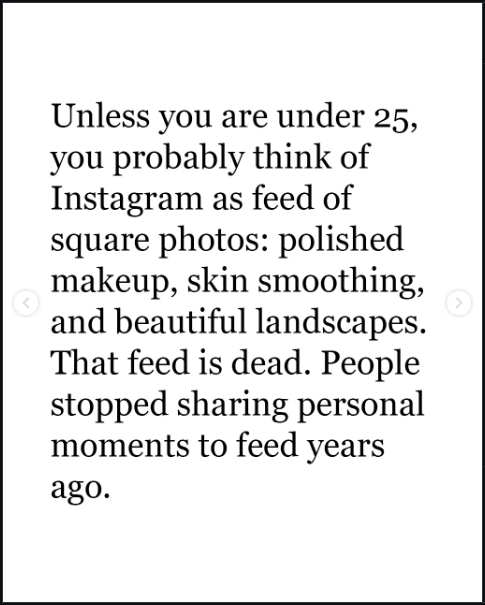
I’m posting this as a screenshot instead of embedding it because I don’t want any of their icky Meta data tracking on my website.
But look at this shit from Adam Mosseri’s Instagram.
If we’re not on “social media” to see posts from friends, why are we there? Maybe the point is just to gain followers? If so, Mosseri’s got some bad news for you there, too.
They’ve got plans for you, bub. To wit: “Looking forward to 2026,” you’ll begin scrolling an endless feed of machine-generated bullshit until the dopamine drip runs dry or the Next Big Thing comes along. They believe you won’t be able to tell the difference between the machine and an actual person. And even if you can spot the difference, they believe you won’t care.
If you do care, please do this: start your own website, just like this one. Social media ate the web because it was an easy way to connect with your friends and share your ideas by building your own little website where they could find you. Now that the social media companies don’t care if you find your friends, and your ideas have to fight for space with the endless remixes generated by their machines, why hang around over there? Come build your own little website here and tell your friends to do the same thing!
Websites like this are from the past, but they are also the future. All of those “platforms” are already dying. When they are gone, this one will still be here.
I love Chrome OS. I am thrilled that there is a team out there making opinionated choices about a computer user interface that isn’t just a slavish copy of Mac or Windows. I’ve been using little workhorse Chromebooks like the one I’m using to type this post for more than ten years and I will continue to use them until Google puts Chrome OS in the graveyard.
I don’t always agree with Google’s opinions about how I should use this machine, though, and I lament some of the compromises they’ve made to enforce those choices. Here are a few lamentations off the top of my head.
The desktop is useless. I get that many people don’t like cluttered desktops, but let’s take a moment to think through the analog before we throw it out. The purpose of the desktop (in my opinion) is to keep the things I use frequently ready-to-hand. On the Chromebook, the desktop is just a blank expanse of nothing. I can’t put apps there, files, links to apps or files in the browser–nothing. What a colossal waste of geography.
Why, yes, that is the wallpaper from the old Nexus 7…
2. The Tote makes no sense. What is it? What goes there? Where am I toting whatever goes in there from, and where are we going? Why does it appear sometimes, but not always?
3. Some “apps” open on a new tab in the browser; others open in their own window. I’m not talking about Android apps installed from Google Play. I mean shortcuts installed as apps. Blame me. I did something wrong to make this happen; but, uh, shouldn’t it be hard to make that kind of mistake? Aren’t these things used by millions of kids for their schoolwork?
4. Google loves installing stuff on this machine without asking me. With each of the bi-weekly required and self-initiated updates, it seems, the teams at Mountain View have got some new ideas for me to try. Sometimes these ideas mean they need to install new apps, like Gemini or Google TV, and
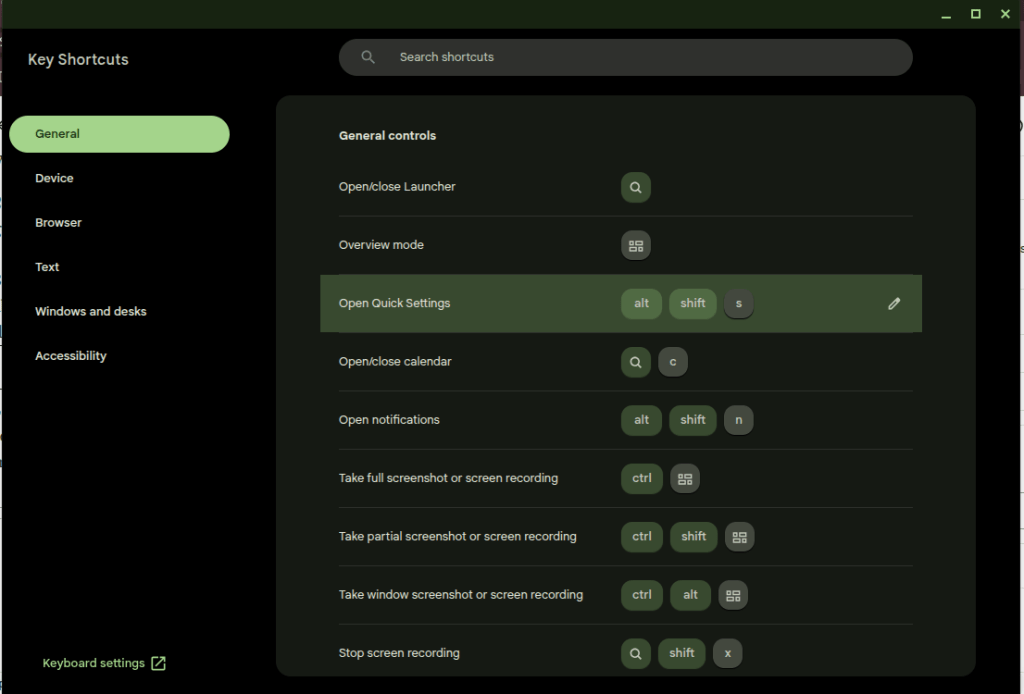
5. Many of the useful keys people want on a computer have been replaced with useless buttons. I’ll trade the Fullscreen and Refresh buttons for the “Home” and “End” keys. Google knows this is a problem because they had to build the whole app in the screenshot down there to explain the arcane grimoire of shortcuts needed to replace the keys they decided I don’t need.
Thank goodness I can put this browser window in Fullscreen mode at the press of a button, though.
That’s enough for now. I don’t hate the player; I hate the game. I want to make my own decisions about how my computers should work, and that’s not the game for a cheap Chromebook. That’s what Linux is for, no?
You know? I should look on the bright side. It’s good to be informed now about Indiana University on both sides of my 32″ monitor (some good information to have here in Alabama), State Farm, AT&T, the Citi Double Cash Card, and T-Mobile. Now I can go out into the marketplace armed with all of this information and make some rational decisions.
I’m not a fan of the phrase “enshittification,” because most of this shit was just shit to begin with*, but this is a truly enormous pile of steaming dung. And it’s not as easy to fight as people would have you believe. Use an AdBlocker and they nag you. If they nag you hard enough you have to block JavaScript, and that has to be done on a site-by-site basis if you want any good JavaScript to execute.** Leave it off, and this is the reward.
What a nice world we’ve built for ourselves here.
* maybe that should be a post one of these days since I see someone pontificating about “enshittification” somewhere every day.
** is there any such thing as good JavaScript anymore? Was there ever?
I pay $20 a month for the “privilege” of editing PDFs.
I understand there are other solutions that allow me to do this for free or at a fraction of the cost. I’ve tried many of these over the years and found that Adobe’s solution works best for me as a production tool. Having reached that conclusion, I don’t mind paying for it.
Lately, however, Adobe is making it hard for me to continue paying this fee. Every time I open the app, close the app, or even just move the mouse to the wrong portion of the screen, I am bombarded with advertisements.
First there is the startup ad. The first time I open the app, every day it seems, I’m presented with a popup detailing new features I might be interested in trying. I must engage with this ad, either positively or negatively, to proceed. It’s like a little toll my brain must pay to start working with PDFs.
(Note: I had already cleared the irritating popup which prompted this post yesterday before I had a chance to grab a screenshot. I knew that if I came back today I would get a new one, and bingo! there it was.)
Checkout this fun popup that I’m paying to see!
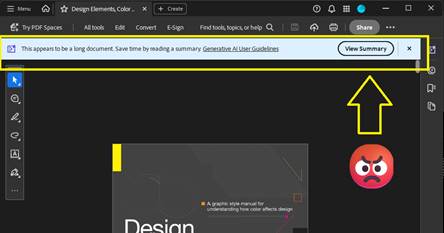
Thankfully I don’t need to close an ad like this every time I open the app for the rest of the day, but every time I open a document, I can be certain that another dialog recommending an AI summary will appear at the top of the screen. Let’s leave for another day the question of whether an AI summary is good for me, good for society, or whatever. Today I am irritated by the simple cognitive labor I have to do every time I open the app to work, to learn, or even just to read for fun. This dialog doesn’t obscure the document, but it consumes valuable real estate on my screen that I often can’t afford to give up. I have to think about it instead of what I’m reading.
Here’s a super-cool dialog that is just big enough to be a distraction. Yay!
After I’ve closed this dialog, I’m still not done dealing with distractions. If I make the mistake of moving the cursor to the bottom of the screen, another dialog appears. Not only does this dialog require another little jolt of cognitive labor to acknowledge and clear the distraction, it creates a slight disincentive against moving the cursor while reading. Worse, this one obscures a portion of the document for a second or more after I move the mouse away from the Hot Zone.
This thing… this thing just really gets under my skin.
There’s something else about this dialog that drives me crazy. It activates a feature that is already controlled by a button at the top of the screen.
Here is the button that is supposed to activate an AI Assistant dialog like the one (but not the same one?) that automatically opens at the bottom of the screen when I move the mouse to the wrong place. It’s got fun colors!
If I wanted to use this feature, I would click the brightly-colored button at the top of the screen! This drives me crazy because the application shouldn’t just execute a command on my behalf – especially not when it has recommended the feature on startup and then reminded me of its existence again and again with popups, dialogs, and colorful buttons. Don’t treat me like a stubborn child who needs to be forced to eat his vegetables. You say you don’t like it, Adobe asks, clearly the wise adult in this exchange, but have you even tried it?
What an insult.
On this computer I pay the bills. If I want to use the damned feature I’ll damn well click the damned button.
This insult poses a philosophical challenge as well. Ask yourself: when is it OK for a machine to operate itself? The deal we’ve made with machines is simple: operators should be the ones operating them. The machine should not operate itself unless the operator has instructed it to do so, or failing to perform an operation would risk injury. When it executes a command on its own, the resulting operation should be limited in scope and duration.
Perhaps a car offers some good analogies. In my car, the headlights turn on automatically when it gets dark because I’ve turned a switch—that is, issued a command—for them to operate that way. If I don’t turn the switch, they don’t turn on. The radio doesn’t randomly change channels to introduce me to new stations (yet). It doesn’t turn on at all unless I press the button. The engine doesn’t change to Eco Mode automatically when I cross the border into a new state. The things that do operate without my explicit command, such as the automatic door locks, do so because the risks associated with error are grave. If I don’t lock the door, it may open in a crash. You can imagine the consequences. I’m willing to hand over a little piece of my autonomy to the machine here.
Does this example of remote execution, this magic AI Assistant dialog, pass that test?
In my most uncharitable moods (like the one shaping this blog post) I think about how failing to click the “Ask AI Assistant” button threatens the careers of all the managers who are responsible for driving user adoption of AI at Adobe. I suspect that Number of Impressions—that is, eyeballs on the AI Assistant feature—is a KPI they can boost by displaying this dialog at the bottom of the screen when I move the mouse down there. When I’m in these dark moods I think that’s a dirty trick to pull on me. It’s especially low down when I’ve been kind enough to allow you to reach into my bank account and automatically withdraw $19.99 every month.
Believe it or not, we’re not done with adverts yet. After capturing the screenshots for this post, I clicked the OS window control to exit the application and close the window. To my amazement, the popup below appeared because I tried to exit without saving the document. Unlike the magic AI Assistant dialog, this could have been helpful! Alas. Rather than simply prompting me to save my changes, some manager at Adobe thought this would be another fantastic opportunity to sell me on a product feature by using dark patterns to drive my behavior. “Share for review” is bright and welcoming. Simply press Enter, it suggests, and turn on the light. And that WhatsApp logo is a big green light saying Go, Go, Go. “Save without sharing,” in contrast, is dark and foreboding, like the mouth of a cave—clearly a button for dullards and dimwits to press so they can stay in the Dark Ages.
They’ve got you coming and going. I pay for this.
Adobe isn’t alone here. Companies are taking these liberties too often. Just today, for example, Teams informed me when I started the app that there was a brand-new Copilot feature for me to try. I have to use Teams for work, so I spend a huge portion of my life—like it or not—staring at this application. I didn’t ask for this. I didn’t opt-in, and I can’t opt-out. My employer didn’t request the feature. But, nonetheless, there it is. A group of managers and devs forced me and millions of others to just live with this thing for eight or more hours per day and hundreds or thousands of dollars per year. And if we don’t care about the feature enough to click on it, they’ll find new ways to remind us that it’s there. I expect to see more popups, more nudges, brighter colors, shimmering icons, and other ruses from the big bag of user psychology tricks reminding me to Try Copilot! until the next KPI comes along that incentivizes Microsoft to arbitrarily and unilaterally change the app again and surface new features.
Adobe ain’t alone. This thing I didn’t ask for had a “helpful” little popup to announce its arrival as well.
I see this happening every day in web apps, mobile apps, desktop apps, even the operating system itself. And before you swing your boots up into the stirrups of your high horse, I know I can use Linux to avoid most of this. I know I can use open source tools. I’ve used Linux as a daily driver on my personal machines since 2007, and I was using open source apps before that. It doesn’t matter. If I want to put food on my table I have to use these products controlled by Microsoft, Adobe, Apple, Google, Esri, Autodesk, and all the other companies who do these short-sighted, authoritarian things to try to alter my behavior and shape my daily existence. I can’t escape it, and neither can you.
But still, if Adobe could chill with the ads in Acrobat, even just a little bit, that would be nice. Until then, I’ll be over here closing popup adverts and keeping my cursor at the top of the window.
(Edit 2/11/2026: It pleases me immeasurably that this post seems to attract bots for SEO and Sales blogs trying to build an audience. Keep those likes coming. Irony is an artifact of the past. -CBC)
TikTok is the future of web browsing. You won’t surf the web; it will be served to you “algorithmically” instead. After a while you’ll be served the content you want and it will feel like it was your idea all along.
AI is the engine to do this. The AI feed will repackage the web, all of the books, all of the recorded audio, and all of the video (which it has already consumed) and deliver it in a feed. You will open the browser and the content will appear. You will scroll and new content will appear.
This is basically the Facebook News Feed or TikTok FYP, but there is a crucial difference. Content there still leads users away from the source. People make the content (or prompt it); people (or their scripts) post the content. They need you to click on it and they want you to follow them off the feed. It’s a dialectic twisted around revenue. Facebook and TikTok want you to keep scrolling so your eyeballs roll over their ads, but Facebook and TikTok need content from users to keep you coming back. Creators who post there want you to click on their content so your eyeballs roll over their ads (or you send them money directly, but they need Facebook or TikTok to put your butt in the seat.
The AI Feed will certainly be burdened by its own internal contradictions, but it will escape this dialectic. Users will stay on the feed because it can endlessly generate content in a way that makes them feel like they’re unique, living on the cutting edge of information, and in control. Creators may post on their own sites (like this one!) but, lacking the “algorithm” and the network effects of a major platform, they will labor in obscurity. Further, the Feed will just consume their content and repackage it.
Maybe the Small Web will come back. Maybe print media will come back. I’ve explored both of those ideas in this blog at many points in the last ten years. Or maybe the AI Feed will be amazing. Who knows? The only certainty is change, change, change.
TRIRIGA/MREF GIS Queries must Include GIS Latitude and Longitude and these must be labeled “Latitude” and “Longtitude.”
This is a quick note in case anyone is struggling with the same problem I encounteredcaused today.
Here’s the scenario.
You’ve got a GIS portal section in TRIRIGA/MREF.
You’ve created the GIS Map record that powers the section.
You’ve set up the extent, configured your basemap(s), connected to one or more data sources for layers.
You’ve created a “GIS Query” record to display TRIRIGA data on the map.
For most of you, it probably just works. Congratulations! If you’re a grug brain like me, though, read on.
No matter what you do, the map doesn’t work! It’s so broken, in fact, that the portal is unstable and your browser reports that the page is unresponsive.
If that’s you, what now?
The TRIRIGA documentation says it plainly enough: “Queries must include display columns that are labeled Longitude and Latitude. The Latitude and Longitude fields pinpoint the item on the map.”
After spending a couple hours today troubleshooting a GIS query, let me make it even more plain.
Make sure your query includes the Location Business Object and (of course) the correct association string.
Add the triGisLatitude and triGisLongitude fields from the Location BO to the query.
Label these fields Latitude and Longitude. This step is important! The fields are called “GIS Latitude” and “GIS Longitude” on the BO, and that won’t work.
Save the query, reload the portal, and voila!
Now I must confess what I did. Learn from grug.
grug see GIS query has longitude and latitude but TRIRIGA locations have no latitude and longitude data
this bad — it mean no TRIRIGA points on map
grug see GIS layer from ESRI includes ID
grug think user need way to open TRIRIGA record when they see something interesting on map
grug see “Show Table” on map viewer and see that records can be opened from the table
grug get idea
maybe user click on “Show Table,” find what they need with ID, and open record that way
this not great, but only option
grug change query to show data shown on GIS layer
grug think user no longer need latitude and longitude on query because these always blank
grug delete latitude and longitude from query because efficiency good
now portal no work and browser mad at grug when page load
grug try fix many ways until stop and eat lunch
maybe read documentation will help, grug think, but it only help a little
after few more tries, grug find answer and then write answer here
If this helped you, hello from the past! If you’re inclined, leave me a comment.
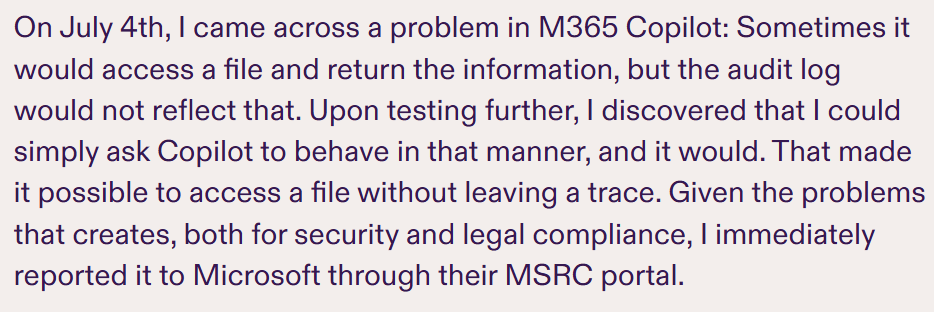
How many of these emergent problems will have to be solved before the product is secure? And even if we could think of everything, how many entirely new problems are these tools creating which will, in turn, also have to be solved?
[Edit: I finished reading the rest of the post, which I’ve just linked again, and holy shit.]
Watching people ask ChatGPT questions about technical matters for which I am a sort of expert and then presenting the hallucinations back to me as facts in real-time is a lot of fun. Does this happen to you?
With LLMs it’s always the same problem. They don’t know the answer; they just know how to run an input sequence through complicated functions that predict the next word in an output sequence. The quote below from this excellent article puts it much better than I can.
Facebook has been a bad product since the introduction of the News Feed, but the switching costs have always been high and it was optimized by some of the best engineers our universities could produce for stickiness. The dual onslaught of Groups, which incentivize low effort/high engagement content, and AI junk, which sometimes checks both of those boxes just right, makes it an even worse product.
It’s still sticky, because we’re all still here, but will that last? Will it last when most of the posts I see give me zero value? Will it last when groups, which are weighted so heavily in the feed, are cesspools of AI-generated nonsense? I hope not. I hope a product manager at Meta is losing sleep over this problem tonight.
This is happening to the whole Internet, though. AI slop is already filling up web pages and discussion forums. Reddit will succumb to it because upvotes are the metric. Comments sections were already astroturfed; now the astroturfers will just cut out the humans sitting in the phone farm. I just had a meeting today where one of the topics was using AI to generate blog posts. There’s no turning back from this garbage because the incentives to use it are so high, and the bill for that convenience won’t become due until the entire Internet is consumed by it.
I printed (and web published) a ‘zine because I believe print is going to make a comeback very soon. By its very nature, print defies the logic of machine generation. We need analog back. The digital ocean is polluted.